


PlayPlus: Earn & Rewards
4.8432.00 Reviews
App Specs
- Version
- 1.0.39
- Updated On
- License
- Free
- Downloads
- 500,000+
- Developer
- Creation Tech Pte. Ltd.
- Categories
- Entertainment
- Platform
- Android
Screenshots
 Analysis by AppCompare
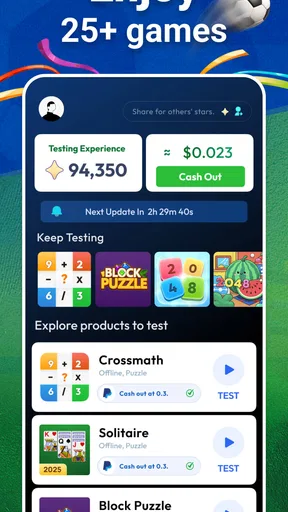
I approached PlayPlus: Earn & Rewards as an entertainment app first, but its real appeal is the way it turns trying games into a small rewards routine. The basic idea is easy to understand: discover games, spend time testing them, and receive rewards through the app’s own system. That makes it different from a normal game library, where the only return is entertainment. Here, the motivation is partly practical, although the experience still depends on whether the available games suit your taste and how much effort you want to invest.
Creation Tech Pte. Ltd. presents PlayPlus as a free app for mature users, and it is available for Android devices running version 7.0 or later. It belongs in the entertainment category rather than being a single game, so I would compare it more closely with reward-based discovery platforms than with a conventional puzzle, action, or strategy title. Its store summary is short, but using it raises more useful questions: Is it comfortable to navigate? Can someone with different visual, motor, or sensory needs use it without unnecessary friction? And is the reward angle worth choosing this over ordinary game recommendations?
How PlayPlus feels to use in everyday situations
I find PlayPlus easiest to approach when I treat browsing and playing as two separate steps: first I decide whether a game and its task suit me, then I give it a focused try. That small pause can make the reward element feel like a useful nudge rather than pressure to keep going. It also sets up the next section, which looks at how those choices fit into ordinary spare moments.
Readability and navigation come before the rewards
The first thing I look for in an app like this is whether I can understand what to do without repeatedly guessing. A rewards platform has several jobs at once: it needs to show available games, explain the action expected from the user, make progress understandable, and keep the reward path visible. If any of those pieces are unclear, the experience quickly becomes tiring, especially for someone who is not already familiar with offer-based apps.
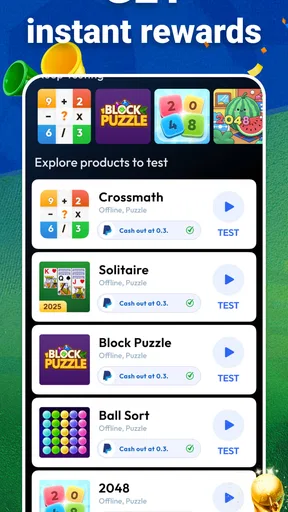
PlayPlus is best approached as a place to browse and test rather than as a single destination game. That distinction matters. When I open a normal game, I expect the interface to lead me directly into play. With PlayPlus, I need to read the surrounding information and decide whether an opportunity is worth my time. Users who prefer a simple, linear screen may find this extra decision-making less comfortable than opening a familiar game from their home screen.
For readability, I would use the app with the device’s own display settings adjusted first. Larger system text, stronger contrast, and a less distracting screen environment can make any reward catalogue easier to scan. This is a useful habit because reward apps often ask users to compare several pieces of information at once, such as the game name, the task, and the expected benefit. Even when the wording is short, dense screens can create more work for people with reduced vision or reading fatigue.
One practical tip is to slow down before selecting a game. I would read the full task wording, identify what action is actually being requested, and only then install or start anything. This is more than a convenience. It helps avoid beginning a title that demands a play style I do not enjoy or that is difficult for me to operate. The app is more useful when I treat its listings as choices to evaluate, not as a queue I must accept automatically.
Worth Reading Before You Choose

EA SPORTS FC Mobile 26 Is a Bigger Football Game, but It Takes Time

Flipboard Shows What News Apps Must Do Beyond the Feed

Switching to Android Auto Means Rethinking Your Driving Routine

Google Calendar Makes a Crowded Week Easier to Manage

Ludo King Makes the Most of the Minutes Between Plans

Baby Panda World Brings Quick Play to Modern Phones, but Its Game Library Feels Busy
The public response around the app is encouraging: PlayPlus holds an average rating of 4.8 from around 23 thousand ratings. That suggests many people find the central concept worthwhile, but a strong average does not remove the need to judge the interface personally. Reward apps can feel excellent to one person and overly busy to another, particularly when reading speed, attention, or tolerance for repeated navigation differs.
Motor and sensory considerations when testing games
The most important accessibility question is not only whether PlayPlus itself is easy to open. The games it points me toward may have completely different controls, pacing, visual styles, and sound demands. That creates a trade-off: the app can help me discover entertainment, but it cannot make every selected game suitable for my hands, eyes, hearing, or concentration.
For someone with limited fine-motor control, fast taps, swipes, or precise timing may be uncomfortable in some games. A person who experiences hand fatigue may prefer titles that allow slower interaction or longer pauses. I would therefore inspect the game choice before committing time to it and avoid assuming that every listed option will be equally manageable. The reward objective should not pressure anyone into continuing an activity that causes pain or strain.
Sensory load is another consideration. Bright animations, rapid movement, frequent sound effects, or changing visual elements can make a game difficult for people who are sensitive to motion or flashing imagery. PlayPlus is not just one controlled visual environment, so the responsibility shifts toward choosing suitable titles and adjusting the phone before play. Lowering volume, using headphones only when comfortable, reducing screen brightness, or enabling the device’s motion and display preferences may help, although those adjustments will not change how an individual game is designed.
People who rely on audio cues should be especially selective. A game may communicate progress visually, through sound, or through both, and the reward platform cannot be treated as proof that a particular title supports every way of receiving information. I would look for games whose instructions remain understandable without depending entirely on one sensory channel. If an objective is unclear when sound is muted, that is a meaningful barrier rather than a minor inconvenience.
There is also a cognitive side to accessibility. Reward tasks can encourage users to focus on completion, but people with attention difficulties may benefit from setting one small session goal instead of browsing endlessly. I find it more manageable to choose one game, note what I need to accomplish, and stop when the session no longer feels useful. This prevents the catalogue itself from becoming a distraction and keeps the reward process from taking over the entertainment.
Situational access: where the app fits and where it does not
PlayPlus makes the most sense in short, flexible moments. Imagine waiting for an appointment or commuting somewhere with a stable connection: I could browse the available games, choose one that matches my energy level, and use the spare time for something more purposeful than scrolling through unrelated recommendations. The app can also suit someone who enjoys trying new mobile games but wants an extra reason to move beyond the titles already installed.
That same scenario changes when the phone is being used one-handed, the surrounding area is noisy, or the user is under time pressure. Reading task details while walking, riding, or handling another activity is not a good workflow. A reward platform asks for attention because selecting the wrong game or misunderstanding the objective can waste time. I would browse only when I can concentrate, then play in a setting where the controls and sound are comfortable.
It may also work for people who want entertainment without paying an entry fee. PlayPlus is free to download, which lowers the barrier to trying the service. However, “free” should be understood as no purchase price for the app itself, not as a promise that every part of the experience will feel effortless. The user’s time, attention, storage, data connection, and willingness to test unfamiliar games are still part of the cost.
For families, the mature 17+ content rating is an important boundary. I would not treat PlayPlus as a general family entertainment hub or hand it to a younger user simply because the app involves games. Adults should consider the rating before recommending it in a shared household, and they should keep the reward aspect separate from children’s expectations about earning something through play.
The app can be a poor fit for anyone who wants a guaranteed, predictable entertainment session. If I have only a few minutes and need a game I already understand, opening a familiar title is usually more efficient. PlayPlus adds discovery and a reward motive, but that also means extra browsing and a dependence on the suitability of the available options. The usual game store is better for searching by genre, known title, or established personal preference; PlayPlus is more attractive when I am open to experimentation.
What the reward model changes about accessibility
The reward angle creates a subtle pressure that ordinary game recommendations do not. When I play a regular game, I can stop whenever I want and feel that the session was still worthwhile. In PlayPlus, I may be tempted to continue because I have already invested time toward a target. That can be motivating, but it can also make physical discomfort, eye strain, or mental fatigue easier to ignore.
My advice is to set a personal stopping rule before beginning. For example, I might decide to play for one comfortable session and reassess rather than chasing completion at any cost. This is particularly useful for users with fluctuating energy, chronic pain, migraines, or concentration limits. The reward should remain an optional benefit, not the reason to override the body’s warning signs.
Another useful workflow is to separate discovery from play. I would browse when I have time to read carefully, shortlist a game that appears suitable, and only then start the testing session. This reduces the number of rapid decisions made while the app is open and makes it easier to notice whether the selected title is accessible in practice. It also avoids confusing the excitement of a new listing with genuine compatibility.
I would keep expectations measured as well. A rewards app can make gaming feel more purposeful, but it does not turn every minute into equal value. The best choice depends on the balance between the task, the game itself, and the effort required. If I dislike the assigned title, struggle with its controls, or cannot comfortably follow its instructions, the reward premise may not compensate for the frustration.
Remaining barriers and points that deserve caution
The biggest limitation is variability. PlayPlus may provide the doorway, but the actual accessibility experience continues inside each game. Two titles can differ sharply in text size, control precision, pace, audio dependence, and tolerance for pauses. That means I cannot judge the entire service from the smoothness of its catalogue screen alone.
There is also a learning burden for first-time users of reward-based entertainment apps. The phrase “play games, test games, get rewards” sounds simple, yet users still need to understand what counts as progress and how to decide whether an opportunity is worth pursuing. I would not rush through the initial instructions. A few minutes spent understanding the workflow can prevent a much longer session built around the wrong assumption.
People with limited data, older hardware, or little free storage should think carefully before exploring many games. The app runs on Android 7.0 and newer, which makes it available to a broad range of devices, but compatibility with the app does not automatically mean every discovered game will feel comfortable on older phones. Performance, loading time, screen size, and control response can all affect whether testing a title is pleasant.
Users who need highly consistent accessibility settings may prefer a carefully chosen game installed directly from a familiar source. That route gives me more control over what I play and lets me learn one interface thoroughly. PlayPlus is better for variety and discovery, not for guaranteeing a uniform interaction style across every session.
I would also avoid treating the rating as a substitute for personal testing. The app has passed half a million installs and has around 426 written reviews, which shows that it has attracted a substantial audience. Still, popularity mainly tells me that the concept resonates with many users; it does not answer whether the text, controls, pace, or reward workflow will suit my particular needs.
Who should try it, and who should choose another route?
I would recommend PlayPlus to adults who already enjoy mobile games, like sampling unfamiliar titles, and appreciate having a reward-related reason to explore. It is especially appealing when I have flexible spare time and do not mind reading task details before playing. The free entry point also makes it easy to test the idea without first committing money.
I would be more cautious about recommending it to someone who needs a very calm, predictable interface or who finds switching between different games tiring. A person with motor or sensory limitations may still use it successfully, but the selection process needs to be deliberate, and each chosen game should be evaluated separately. If accessibility is the deciding factor, a known title with suitable controls may be a safer choice than a discovery platform.
Players who dislike reward-driven routines should probably skip it. If I want to choose a game purely for its story, mechanics, or atmosphere, the extra task structure may feel like clutter. Likewise, anyone expecting guaranteed earnings or a fixed return from every session is likely to be disappointed by the basic nature of the concept. The app is best understood as entertainment discovery with an added incentive, not as a replacement for work or a dependable income source.
Its current version is 1.0.39, so I would keep the app updated through the normal platform process and pay attention to how each release feels on my device. That is sensible for any evolving app, but particularly for one whose value depends on a smooth relationship between browsing, testing, and rewards. If navigation becomes confusing or a selected game no longer fits my needs, I would move on rather than forcing the session.
My inclusive verdict
PlayPlus is an interesting option for adults who want to discover mobile games while adding a reward motive to the experience. I like the flexibility of the idea: instead of committing to one genre, I can use the app as a starting point for trying something different. Its strong user response and broad Android availability make it easy to consider, while the free price removes an obvious initial obstacle.
My honest qualification is that inclusion depends heavily on what happens after discovery. The platform can be readable and manageable for one person, yet the selected game may introduce small text, demanding controls, intense visuals, or instructions that rely on sound. I would therefore use device accessibility settings, choose carefully, take breaks, and treat comfort as more important than completing a reward objective.
The best way to use PlayPlus is as a selective discovery tool, not a race to finish every task. That approach suits its strengths and reduces its main friction. If you enjoy experimenting, have the attention to compare options, and are comfortable with the mature age rating, it is worth trying. If you need one consistent, fully predictable game experience, a familiar direct download will probably serve you better.
Overall, I see PlayPlus as a worthwhile entertainment app for the right kind of user: curious, patient, and willing to make deliberate choices. It does not remove the accessibility differences between mobile games, but it can still fit comfortably into an inclusive routine when I choose sessions around my own abilities, surroundings, and energy. That balance is what determines whether the reward feature feels like a welcome extra or an unnecessary demand.
Pros
- Multiple reward options can suit different user preferences.
- Simple interface makes available tasks easy to browse.
- Progress tracking helps users monitor points and reward goals.
- Regular task updates can provide new earning opportunities.
- Suitable for short
- casual sessions during spare time.
Cons
- Reward availability may vary by country or user profile.
- Some tasks can require significant time for modest points.
- Cash-out thresholds may take time to reach.
- Certain offers may redirect users to external websites.
- Earnings are not guaranteed and depend on available activities.
FAQs for PlayPlus: Earn & Rewards
What is PlayPlus: Earn & Rewards, and how does it work?
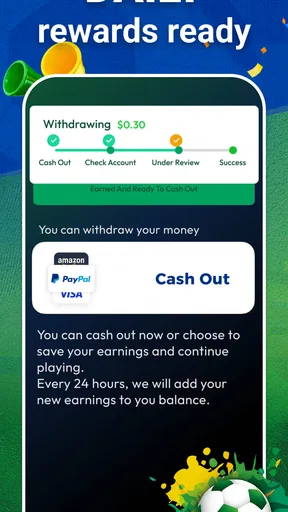
PlayPlus: Earn & Rewards is an app that lets users discover games, complete selected activities, and potentially earn points or rewards in return. After installing the app, you generally browse the available offers, choose an activity, and follow its requirements. Rewards depend on completing the conditions correctly, and availability may vary by country, device, account, and promotional campaign.
Can I really earn money or gift cards with PlayPlus: Earn & Rewards?
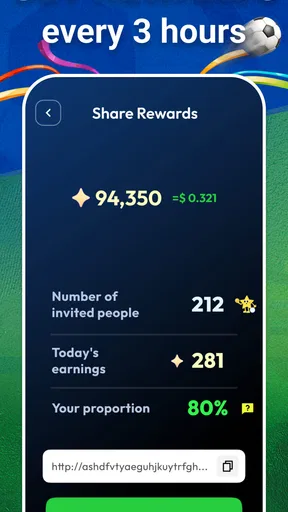
The app may provide rewards such as points, gift cards, or other redemption options, but earnings should not be treated as guaranteed income. The amount you can collect depends on the offers available, how often you use the app, and whether you meet every requirement. Before starting, check the current reward catalog, minimum withdrawal threshold, and applicable terms.
Is PlayPlus: Earn & Rewards free to download and use?
PlayPlus: Earn & Rewards may be free to install, but users should still review the app’s terms before participating. Some activities can involve advertisements, external game downloads, optional purchases, or data usage. You should never assume that spending money is necessary to receive a reward. Read each offer carefully and avoid activities whose requirements are unclear or unsuitable.
What personal information and permissions does the app require?
The permissions requested by PlayPlus: Earn & Rewards can depend on the device version and the features you use. Reward platforms may collect information related to your device, app activity, advertising interactions, and account details to track completed offers. Review the privacy policy and permission prompts before continuing, and avoid granting access that is not relevant to the app’s stated functionality.
Why might my points or reward not be credited in PlayPlus: Earn & Rewards?
Points may fail to appear if an offer was already completed, tracking was interrupted, an ad blocker or privacy setting prevented attribution, or the activity was not started through the app’s offer link. Delays can also occur while results are being verified. Keep screenshots and completion details, then contact support through the app if the reward remains pending or missing.


